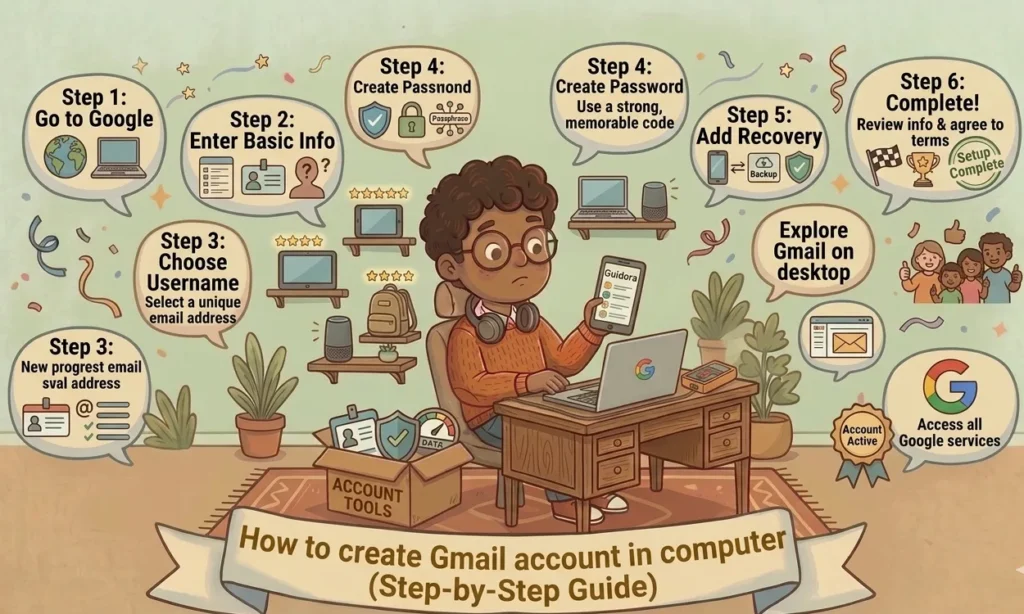
Learning how to create a new Gmail account is one of the most useful digital skills today. Gmail helps users send emails, manage files, access online services, and communicate professionally. Thankfully, the signup process is simple and beginner-friendly.
Millions of people use Gmail daily for work, school, shopping, and social media accounts. Moreover, Gmail integrates smoothly with many Google services like Google Drive, YouTube, and Google Docs.
This complete guide explains how to create a new Gmail account step by step. Additionally, it covers security tips, mobile setup, troubleshooting, and account management advice.
Table of Contents
Why Gmail Is the Most Popular Email Service
Gmail has become one of the world’s leading email platforms. Its clean interface, strong security, and free storage attract millions of users worldwide.
Some major advantages include:
- Free email service
- Strong spam filtering
- Easy mobile access
- Cloud storage integration
- Reliable security features
Additionally, Gmail works across computers, smartphones, and tablets. As a result, users can access emails anywhere.
Google continuously improves Gmail with better features and protection systems. Therefore, many professionals trust Gmail for personal and business communication.
You can access Gmail through the official website:
Things You Need Before Creating a Gmail Account
Before starting the signup process, prepare a few essential things. Proper preparation makes account creation faster and smoother.
Internet Connection
A stable internet connection is necessary for completing registration. Weak networks may interrupt verification steps.
You can use:
- Home Wi-Fi
- Mobile data
- Public internet connections
However, secure private networks are always safer.
Phone Number Verification
Google often requests a phone number during signup. This step improves account security and helps recover accounts later.
Phone verification can:
- Prevent fake accounts
- Improve account protection
- Help reset forgotten passwords
Therefore, using an active phone number is highly recommended.
Choosing a Strong Password
Strong passwords protect Gmail accounts from hackers.
A secure password should include:
| Password Element | Example |
|---|---|
| Uppercase Letters | A, B, C |
| Lowercase Letters | a, b, c |
| Numbers | 1, 2, 3 |
| Symbols | @, #, ! |
Avoid using birthdays or simple words because hackers can guess them easily.
How to Create a New Gmail Account Step by Step
Now let’s go through the complete Gmail signup process.
Visit the Gmail Signup Page
First, open your browser and visit the official Gmail signup page:
Click “Create Account” to begin.
Google may ask whether the account is for:
- Personal use
- Business use
- Child accounts
Choose the appropriate option.
Enter Personal Information
Next, fill in your details carefully.
You’ll need:
- First name
- Last name
- Desired email username
For example:
If your preferred username is unavailable, Google suggests alternatives automatically.
Choose Your Gmail Address
Selecting the right Gmail address matters greatly. Professional usernames look more trustworthy.
Good examples include:
Avoid confusing usernames containing too many random numbers.
A clean email address helps with:
- Job applications
- Business communication
- Online professionalism
Create a Secure Password
After choosing a username, create a secure password.
Best practices include:
- Minimum 12 characters
- Mix letters and symbols
- Avoid repeated passwords
Strong passwords greatly reduce hacking risks.
Additionally, password managers can store passwords securely.
Verify Your Phone Number
Google usually sends a verification code through SMS.
To complete verification:
- Enter your phone number
- Receive the code
- Type the verification code
- Continue signup
This step confirms account ownership.
Sometimes verification takes a few minutes. Therefore, patience helps.
How to Set Up Gmail on Mobile Devices
After creating your account, setting up Gmail on mobile devices improves convenience.
Gmail Setup on Android
Android devices integrate naturally with Gmail.
To add Gmail on Android:
- Open Settings
- Tap Accounts
- Select Add Account
- Choose Google
- Sign in
Your Gmail account then syncs automatically.
Android users can also access:
- Google Photos
- Google Drive
- Google Calendar
Everything works together smoothly.
Gmail Setup on iPhone
iPhone users can also use Gmail easily.
To set up Gmail on iPhone:
- Open Settings
- Tap Mail
- Select Accounts
- Tap Add Account
- Choose Google
Enter your Gmail credentials and complete verification.
After setup, email synchronization begins automatically.
Important Gmail Features You Should Know
Gmail includes many powerful tools beyond basic email sending.
Gmail Storage
Free Gmail accounts include generous cloud storage shared across Google services.
Storage covers:
- Emails
- Google Drive files
- Photos
- Attachments
If storage fills up, users can upgrade through Google One.
Spam Protection
Gmail’s spam filtering is highly effective.
It automatically blocks:
- Phishing emails
- Dangerous attachments
- Fake promotions
As a result, inboxes remain cleaner and safer.
Still, users should avoid clicking suspicious links.
Google Drive Integration
Gmail connects seamlessly with Google Drive.
Benefits include:
- Large file sharing
- Cloud storage
- Easy collaboration
Instead of attaching huge files directly, Gmail shares Drive links efficiently.
Tips to Keep Your Gmail Account Secure
Online security matters more than ever. Fortunately, Gmail offers several strong security features.
Enable Two-Factor Authentication
Two-factor authentication adds an extra protection layer.
When enabled:
- Password alone isn’t enough
- Google requests verification codes
- Unauthorized access becomes harder
You can enable it through:
This simple feature greatly improves account safety.
Avoid Phishing Emails
Cybercriminals often send fake emails pretending to be legitimate companies.
Warning signs include:
- Strange links
- Urgent requests
- Spelling mistakes
- Fake login pages
Always verify email sources carefully.
Regular Password Updates
Changing passwords regularly improves long-term security.
Experts recommend:
- Updating passwords every few months
- Using unique passwords
- Avoiding password reuse
Small habits can prevent major problems later.
Common Gmail Signup Problems and Solutions
Sometimes Gmail account creation doesn’t go smoothly. Thankfully, most issues are easy to fix.
Username Already Taken
Popular usernames disappear quickly.
Try adding:
- Numbers
- Initials
- Keywords
For example:
- johnsmith2026
- alexwrites
Creative variations usually work well.
Verification Code Not Received
If the SMS code doesn’t arrive:
- Wait a few minutes
- Check phone signal
- Request another code
Additionally, restarting your phone may help.
Weak Password Error
Google blocks weak passwords automatically.
To fix this:
- Add symbols
- Increase password length
- Avoid dictionary words
Strong passwords protect personal information effectively.
Best Practices for Managing Gmail Efficiently
Good organization improves productivity significantly.
Use Labels and Folders
Labels organize emails neatly.
Common labels include:
- Work
- Personal
- Finance
- School
Clean inboxes reduce stress greatly.
Archive Old Emails
Instead of deleting messages, archive them.
Archived emails remain searchable while reducing inbox clutter.
This feature keeps accounts organized long term.
Enable Notifications Wisely
Too many notifications can become distracting.
Customize alerts for:
- Important contacts
- Work emails
- Priority messages
Balanced notifications improve focus and efficiency.
FAQs About How to Create a New Gmail Account
Is creating a Gmail account free?
Yes, Gmail accounts are completely free for personal users.
Can I create multiple Gmail accounts?
Yes, Google allows users to create multiple accounts.
Do I need a phone number for Gmail?
Google may request phone verification for security purposes.
Can I use Gmail on my phone?
Yes, Gmail works on Android, iPhone, tablets, and computers.
What should I do if I forget my Gmail password?
Use Google’s account recovery tools to reset your password securely.
Is Gmail secure for business communication?
Yes, Gmail offers advanced security features trusted by millions of businesses worldwide.
Conclusion
Learning how to create a new Gmail account is simple, fast, and highly beneficial. Gmail provides secure communication, cloud integration, and reliable email management for both personal and professional use.
This guide explained the complete signup process, mobile setup, security tips, and troubleshooting solutions. Additionally, it highlighted best practices for managing Gmail efficiently.
By following these steps carefully, users can create secure Gmail accounts confidently. Strong passwords, two-factor authentication, and smart inbox management improve long-term account safety significantly.
Gmail continues to remain one of the best email services available today. Therefore, creating a Gmail account is a smart step toward better digital communication.
for more content about internet and digital guides , visit this directory.
Read also :